How ComplianceAide works

Agentic AI that turns a conversation into compliance work.

Start with everything, nothing, or anywhere in between. ComplianceAide explains the requirement, asks for what matters, performs the analysis, guides remediation, and produces review-ready work.

The AI does the work. Qualified people stay in control.

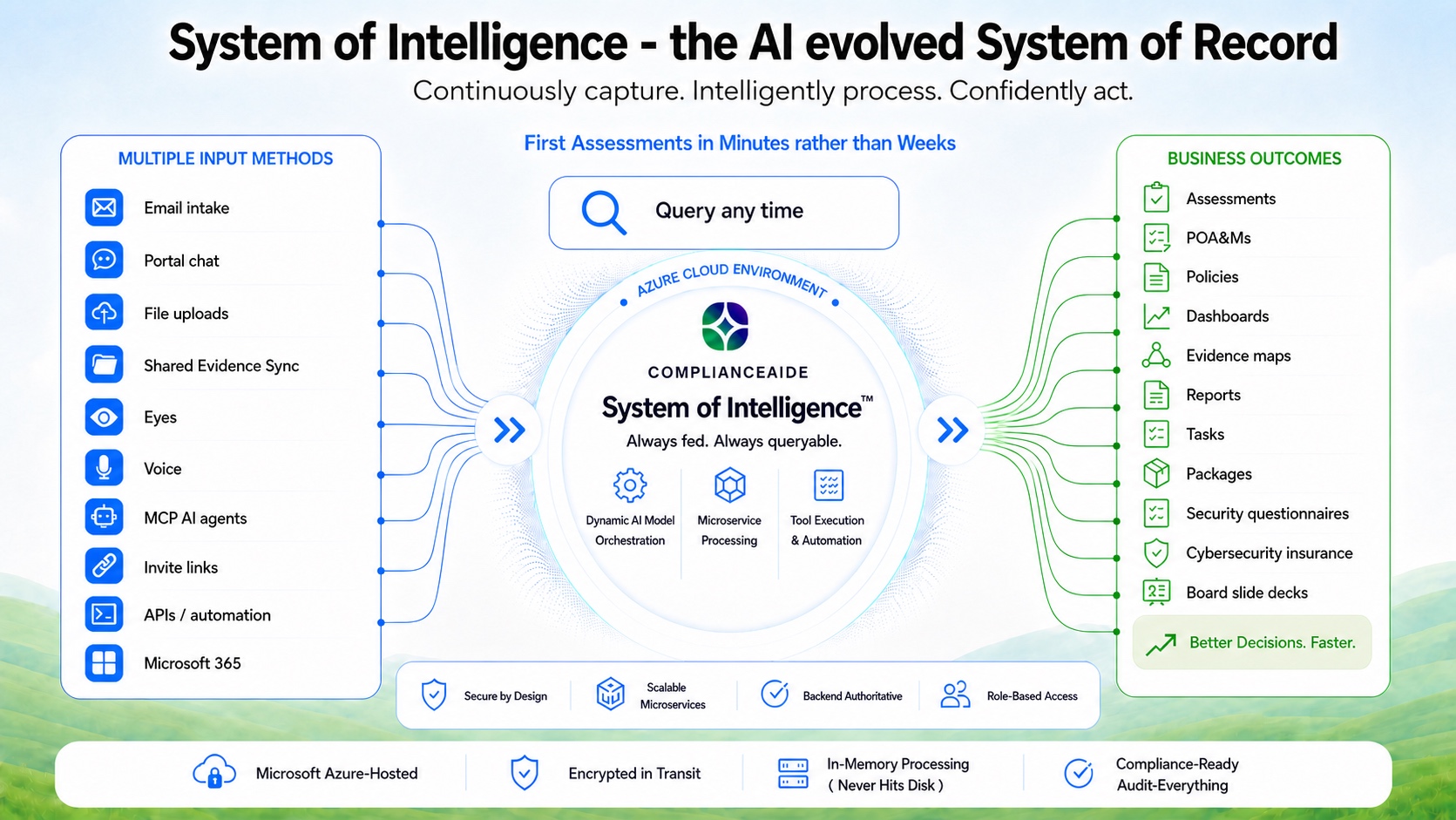
System of Intelligence diagram showing multiple evidence and communication inputs feeding a queryable, Azure-hosted ComplianceAide intelligence layer that produces assessments, POA&Ms, policies, dashboards, evidence maps, reports, tasks, packages, security questionnaires, cybersecurity insurance support, and board slide decks.

The diagram, unpacked

One flow. Four working layers.

Follow the work from the context coming in, through the intelligence layer, to the outcomes your team can use—then look underneath at the controls supporting the path.

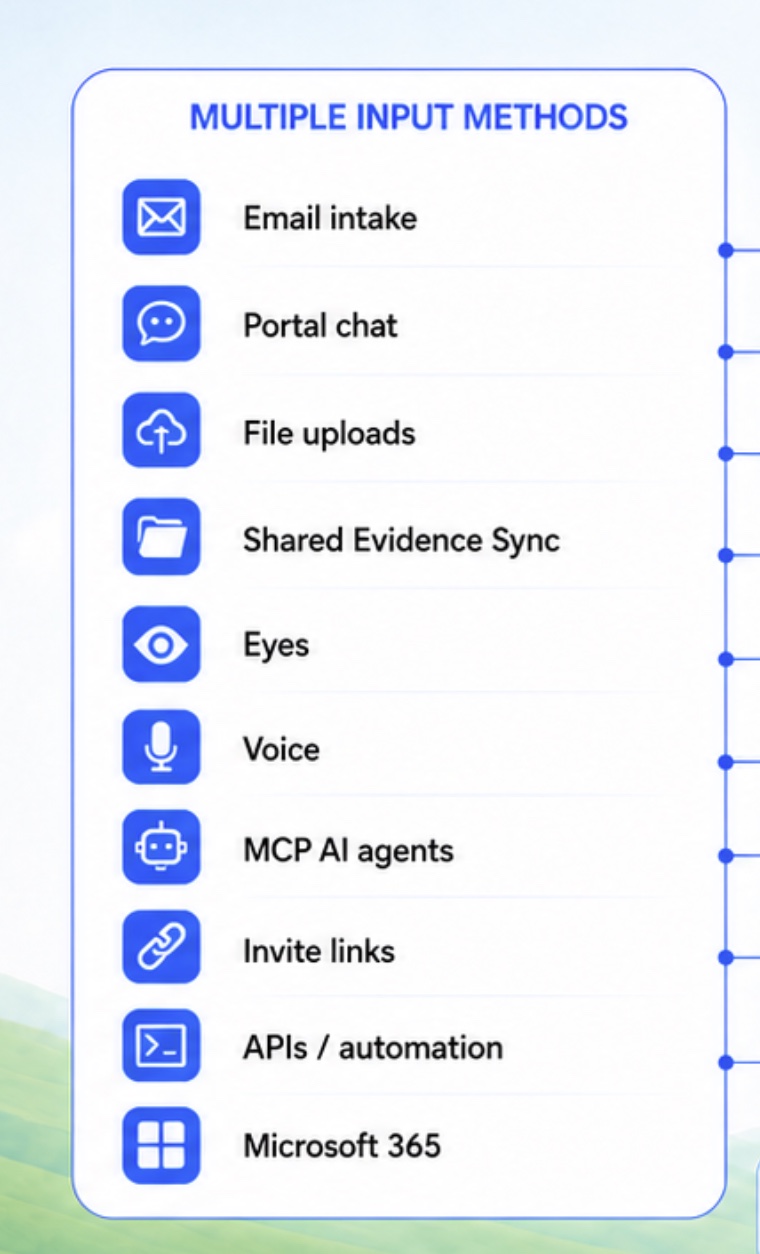
  1. Multiple input methods including email, portal chat, file uploads, shared evidence, visual and voice input, invite links, APIs, approved AI-agent workflows, and Microsoft 365

    01 Capture

    Bring the context you already have.

    Start with a conversation, a document set, shared evidence, or connected workflows. ComplianceAide keeps those inputs tied to the same working context instead of forcing the team to rebuild it for every request.

    • Human inputPortal chat, email, voice, and invite links.
    • Evidence inputFiles, shared evidence, and visual capture.
    • Connected inputMicrosoft 365, APIs, automation, and approved agent workflows, depending on the configured environment.
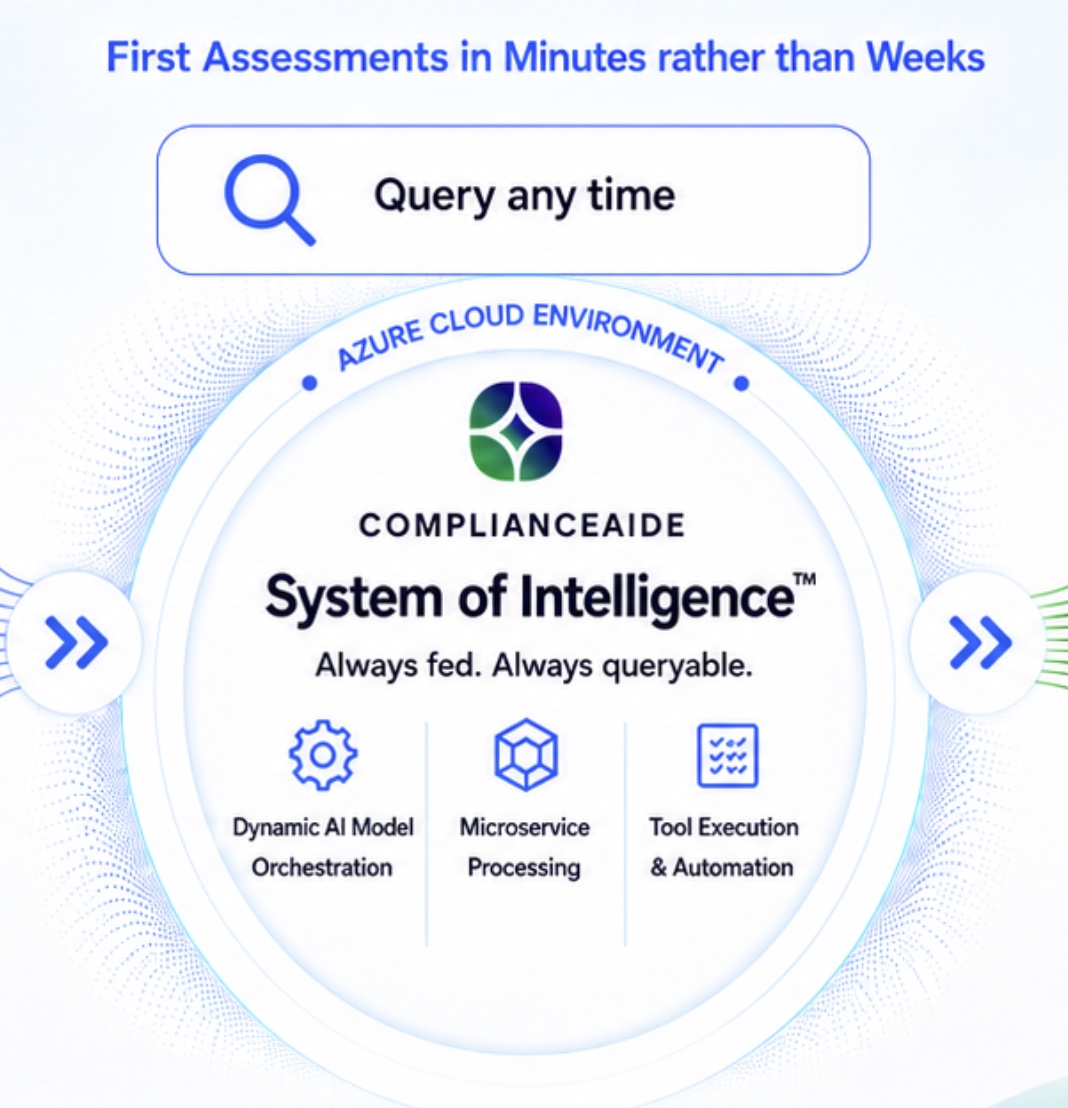
  2. Queryable ComplianceAide System of Intelligence with dynamic AI model orchestration, microservice processing, and tool execution and automation

    02 Enrich

    Build a body of intelligence that grows with you.

    ComplianceAide enriches a growing, dynamic body of data in the secure location you control—not on ComplianceAide servers. Add evidence, ask questions, run assessments, and create outputs; the more you work with it, the more connected, useful, and valuable that data becomes.

    • OrchestrateRoute each task to the model and process suited to the work.
    • EnrichKeep evidence, requirements, findings, rationale, and new context connected.
    • CompoundReuse accumulated context across future questions, assessments, and outputs instead of starting over.
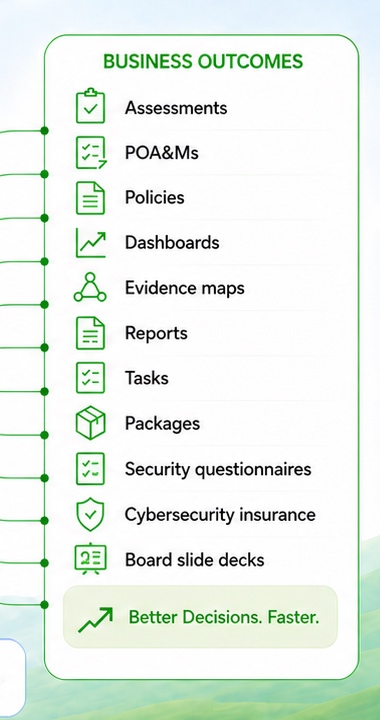
  3. Business outcomes including assessments, POA&Ms, policies, dashboards, evidence maps, reports, tasks, packages, security questionnaires, cybersecurity insurance support, and board slide decks

    03 Act

    Turn context into work the business can use.

    The same source-connected workspace can support readiness work, assurance requests, executive communication, and the next action—prepared for responsible review.

    • ReadinessAssessments, evidence maps, policies, and POA&M-style remediation work.
    • AssuranceSecurity questionnaires and support for cybersecurity insurance applications.
    • CommunicationReports, dashboards, board slide decks, tasks, and packages.
  4. 04 Govern

    Build security and governance into the path.

    The operating foundation combines Azure-hosted architecture, controlled access, traceable processing, encrypted traffic, and auditable workflows so teams can move quickly without separating the work from its controls.

    • Controlled accessRole-based access supports defined responsibilities.
    • Traceable processingAuthoritative services keep the workflow inspectable.
    • Auditable workActivity and outputs remain connected to the operating record.
    Security and architecture foundation highlighting secure-by-design services, scalable microservices, authoritative backend processing, role-based access, Azure hosting, encrypted traffic, and auditable workflows

Four stepsHow the work moves

From a blank workspace to a review-ready report.

It’s like having a compliance expert sitting beside you, 24/7.From the first question to a review-ready result, choose a framework, add the evidence you already have, and let ComplianceAide organize the assessment work. Your team reviews and approves the result before it is shared or acted on.

  1. 01

    Pick a framework and start the conversation.

    Choose the framework that fits the requirement. Then ask questions or describe the organization in plain language.

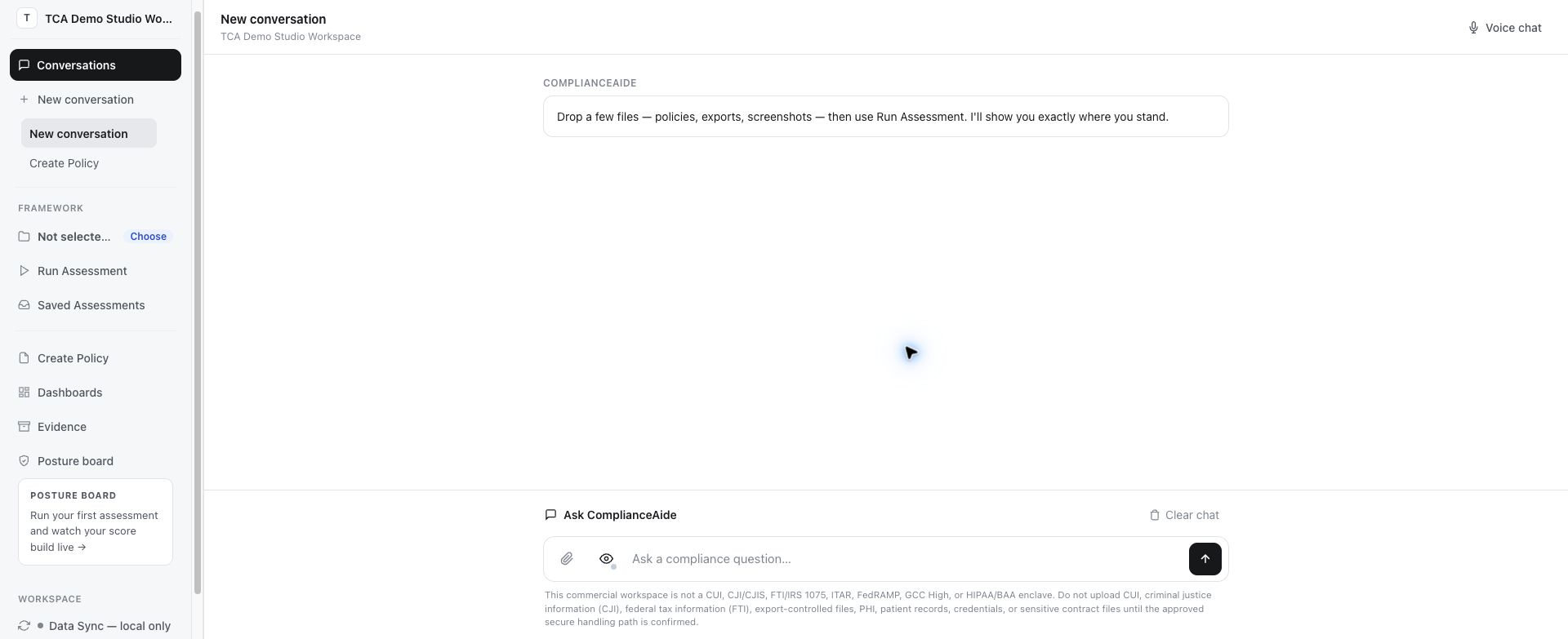
    ComplianceAide clean workspace with a new conversation and framework, assessment, evidence, and policy navigation ready to use
    Current product viewStart with a clean workspace, then choose the framework that fits the work.
  2. 02

    Answer—or add the evidence you already have.

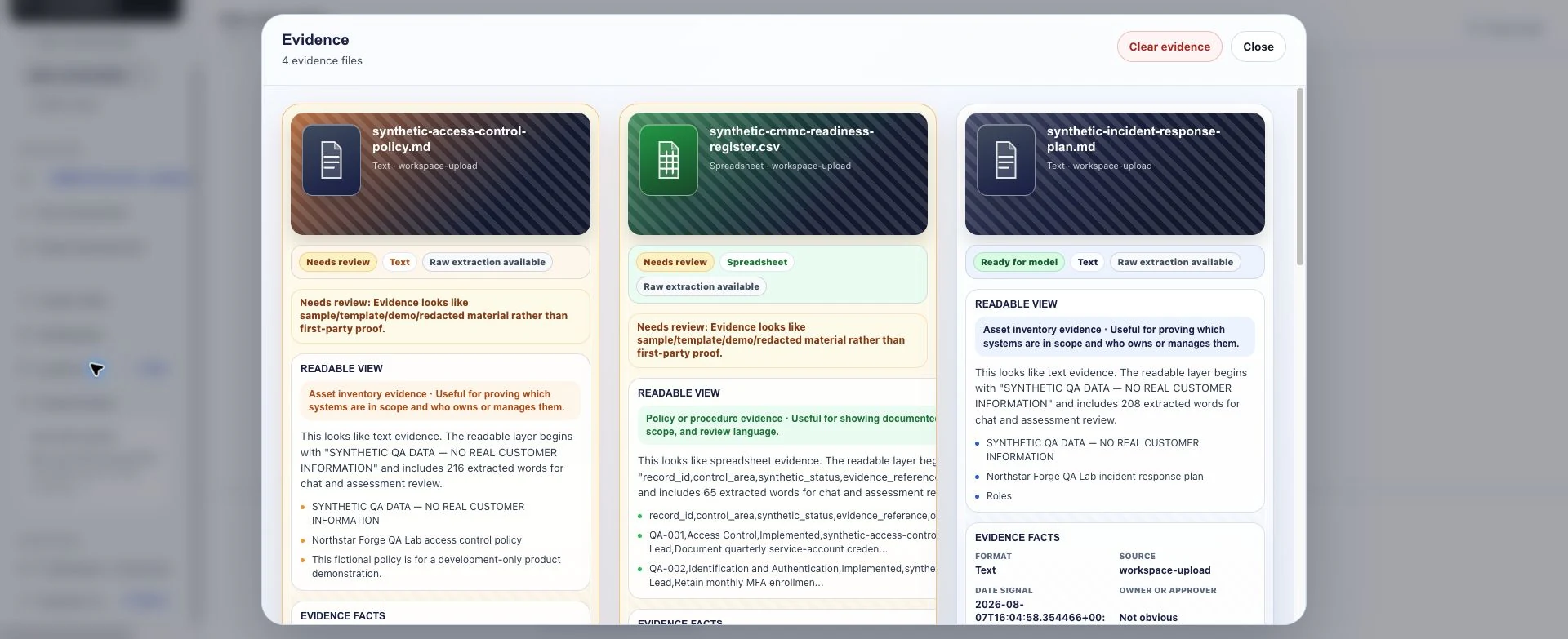
    Upload policies, exports, screenshots, and notes. ComplianceAide organizes what is usable, flags what needs review, and keeps source context visible.

    ComplianceAide evidence library showing uploaded policy, spreadsheet, and incident-response files with review status and readable source details
    Current product viewEvidence remains inspectable instead of disappearing into a black box.
  3. 03

    Every finding carries its source context.

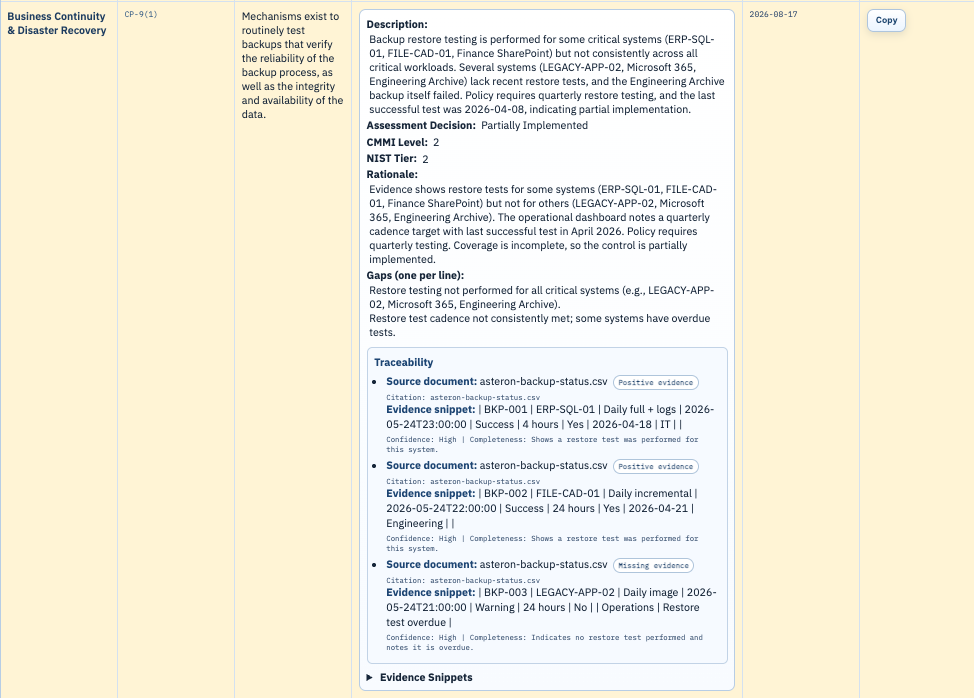
    Trace requirements to source documents, citations, exact evidence snippets, confidence, completeness, rationale, and visible gaps. ComplianceAide’s multi-agent architecture provides purpose-built anti-hallucination guardrails designed to produce extremely accurate, reviewable results.

    ComplianceAide finding showing its requirement, rationale, gaps, source documents, citations, confidence, completeness, and exact evidence snippets
    Evidence trailEach finding keeps its supporting source context visible.
  4. 04

    Review the findings and decide what happens next.

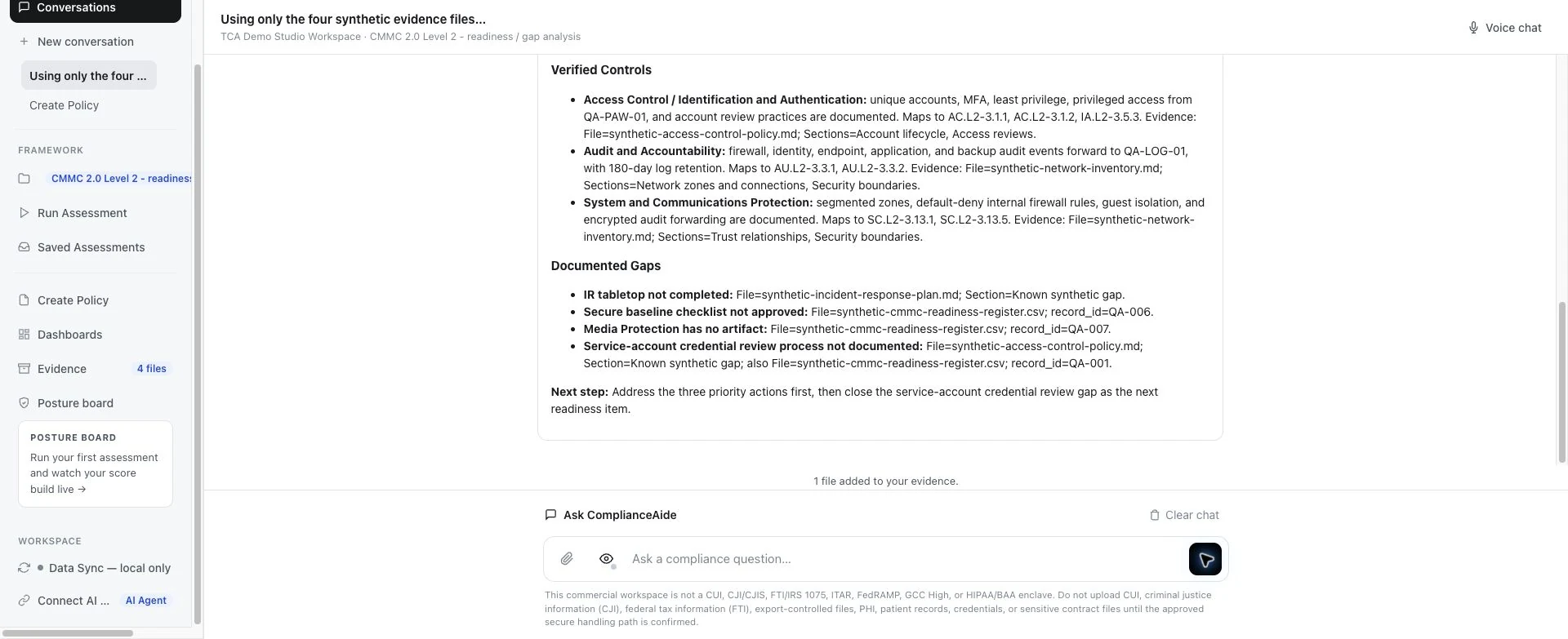
    See supported controls, documented gaps, source references, and prioritized follow-up. Your team reviews and approves the work before it leaves the workspace.

    ComplianceAide assessment output showing verified controls, documented gaps, evidence references, and the next recommended action
    Current product viewThe report shows both support and unresolved work.

The responsible boundary

AI assists the work. Accountable people make the decisions.

ComplianceAide supports

  • Evidence organization and control mapping
  • Gap analysis and evidence-cited rationale
  • Draft policies and remediation recommendations

ComplianceAide does not

  • Certify a client or issue an attestation
  • Replace the responsible reviewer or independent assessor
  • Guarantee an outcome or completion timeline

See what ComplianceAide can complete in your first session.

Talk with our sales team about your evidence flow, selected requirements, and remediation process.

Let's Talk